Integrations
AI-ready integrations: one MCP surface for every linked app
Open Register's integration registry gives AI agents (MCP) access to Nextcloud apps that ship no MCP tools of their own.
Most Nextcloud apps — Deck, Forms, Maps, Cospend, Polls, TimeManager, Collectives, Photos, Bookmarks — have no native MCP surface. To an AI agent they are invisible: the agent cannot see them, query them, or write to them. The integration registry changes that. By linking those apps through Open Register as leaves, the agent can discover, read, link, and create in them through a single Open Register MCP tool:
Apps that were MCP-invisible become MCP-addressable for free.
The tool is openregister.integrations (provided by IntegrationsToolProvider, openregister#1853). It exposes five actions:
| Action | What it does |
|---|---|
list-integrations | Enumerate every integration registered on this instance (id, label, group, enabled, requiredApp, storageStrategy). The agent's discovery entry-point. |
list | List the linked things one integration exposes for a given object. |
get | Fetch one linked thing by id. |
link | Attach an existing upstream thing to an object. |
create | Create a new upstream thing and link it (where the integration's storage strategy supports writes). |
An agent calls list-integrations once to learn what is wired, then list/get/link/create against any leaf — so a single tool reaches Deck cards, Maps locations, Cospend bills, Forms responses, and 20+ more, without each of those apps needing its own MCP server. Read the full agent walkthrough in AI-agent / MCP setup.
The same registered set is also advertised on the OCS capability surface under openregister.integrations (with per-leaf requiredApp, available, storageStrategy, and surfaces), so non-MCP clients discover the registry the same way.
Adding a leaf is the cheapest way to make a previously MCP-silent Nextcloud app addressable by an AI agent. You write one provider; you get MCP discovery, query, link, and create for free.
What is a leaf
Every "linked thing" on an Open Register object is a leaf. Meetings, contacts, files, wiki pages, kanban cards, chat threads — each is a leaf: a vertical slice that links a Nextcloud app or external service to Open Register objects, with the same provider contract on the backend and the same registry surface on the frontend (a sidebar tab + a dashboard widget). Plus a separate set of integrations for LLMs and automation engines.
Leaf integrations
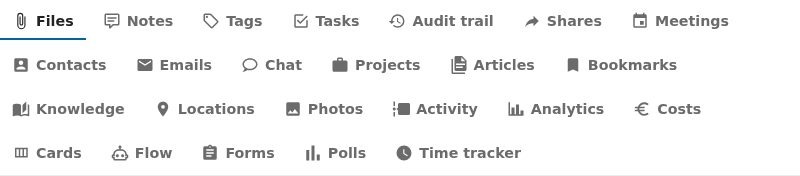
Open Register ships 18 leaves plus the 5 always-available built-ins (24 advertised providers in total). Every leaf surfaces as a sidebar tab on linked objects, a dashboard widget in four surfaces, and an admin row with health status. See Leaf integration system for the architecture and Pluggable integration registry for the full ADR-019 contract.
Start here:
- Maturity tiers — Tier 0 → Tier 4, what each tier delivers, and why Tier 4 is the MCP-enablement capstone.
- Leaf status — per-leaf table: tier, link table, picker, create, and MCP-addressable status for all 24 leaves.
- Setup guides — per-tier guides: using an integration, external connections, and the AI-agent / MCP path.
Always-available built-ins
- Files — files attached to an object (magic-column).
- Notes — free-form notes (link-table). Documented under the pluggable integration registry.
- Tags — system tags (link-table).
- Tasks — to-dos (link-table).
- Audit trail — every change on the object (query-time).
NC-native leaves
| Group | Leaf |
|---|---|
| Core | Shares |
| Comms | Calendar · Contacts · Email · Talk |
| Docs | Bookmarks · Collectives · Maps · Photos |
| Workflow | Activity · Analytics · Cospend · Deck · Flow · Forms · Polls · Time tracker |
External leaves (OpenConnector-routed)
- xWiki — link xWiki pages with breadcrumb + text preview.
- OpenProject — link OpenProject work packages.
OpenRegister's own push events
OpenRegister itself emits notify_custom events on every object lifecycle change so consumers can subscribe and refresh without polling.
- OpenRegister Push Events —
or-object-{uuid}andor-collection-{register}-{schema}event reference, fan-out semantics, batch mode, subscription examples.
LLM hosting platforms
Services that host and run large language models locally.
- Ollama — simple native API for running LLMs.
- Hugging Face — TGI / vLLM with an OpenAI-compatible API.
LLM models
Specific models you can plug in.
Entity extraction
- Presidio — Microsoft's PII detector.
Automation platforms
- n8n — workflow automation.
- Windmill — developer-focused workflow engine.
- Custom webhooks — build your own.
Integration Architecture
The following diagram shows how all integrations work together in OpenRegister:
Integration Flow
1. Text Extraction Pipeline
2. Chat & RAG Pipeline
3. Automation Pipeline
Integration Comparison
LLM Hosting Platforms
| Platform | API Type | Setup Difficulty | Performance | Best For |
|---|---|---|---|---|
| Ollama | Native | ⭐⭐⭐⭐⭐ Easy | ⚡⚡⚡ Good | Development, simple setup |
| TGI | OpenAI-Compatible | ⭐⭐⭐ Medium | ⚡⚡ Fast | Production, optimized |
| vLLM | OpenAI-Compatible | ⭐⭐⭐ Medium | ⚡⚡⚡ Very Fast | High throughput |
LLM Models
| Model | Size | Use Case | Hosting |
|---|---|---|---|
| Mistral 7B | 7B | Chat, RAG, general purpose | Ollama, TGI, vLLM |
| Dolphin | 0.3B | Document parsing, OCR | Custom container |
Entity Extraction
| Service | Accuracy | Languages | Best For |
|---|---|---|---|
| Presidio | 90-95% | 50+ | GDPR compliance, production |
| MITIE | 75-85% | Limited | Fast local processing |
| LLM-based | 92-98% | All | Highest accuracy |
Automation Platforms
| Platform | Language | Use Case | Best For |
|---|---|---|---|
| n8n | Visual/JS | Workflow automation | Non-developers |
| Windmill | Python/TS/Go/Bash | Script execution | Developers |
| Custom Webhooks | Any | Custom integrations | Full control |
Quick Start Guide
For AI Chat & RAG
- Choose LLM Hosting: Start with Ollama for easiest setup
- Pull Model: Download Mistral or Llama 3.2
- Configure: Set up in OpenRegister Settings → LLM Configuration
- Enable RAG: Vectorize your objects and files
For Document Processing
- Deploy Dolphin: Start Dolphin container for OCR
- Configure: Set Dolphin as extraction method
- Process Files: Upload documents for automatic processing
For GDPR Compliance
- Start Presidio: Presidio is included in docker-compose
- Configure: Enable entity extraction in settings
- Monitor: Track PII in GDPR register
For Automation
- Choose Platform: n8n for workflows or Windmill for scripts
- Set Up Webhooks: Register webhook endpoints
- Create Workflows: Build automation for your use cases
Integration Requirements
Minimum Requirements
- CPU: 4+ cores recommended
- RAM: 16GB minimum (32GB recommended for larger models)
- Storage: 50GB+ for models and data
- GPU: Optional but recommended (8GB+ VRAM for LLMs)
Docker Requirements
- Docker 20.10+
- Docker Compose 2.0+
- NVIDIA Docker runtime (for GPU support)
Configuration Overview
LLM Configuration
# docker-compose.yml
services:
  ollama:
    image: ollama/ollama:latest
    # ... configuration

  tgi-mistral:
    image: ghcr.io/huggingface/text-generation-inference:latest
    # ... configuration
Entity Extraction Configuration
services:
  presidio-analyzer:
    image: mcr.microsoft.com/presidio-analyzer:latest
    # ... configuration
Document Processing Configuration
services:
  dolphin-vlm:
    build: ./docker/dolphin
    # ... configuration
Best Practices
1. Start Simple
Begin with Ollama for LLM hosting - it's the easiest to set up and configure.
2. Use GPU When Available
GPU acceleration provides 10-100x performance improvement for LLMs and document processing.
3. Choose Right Model Size
- Development: Use smaller models (3B-7B) for faster iteration
- Production: Use larger models (7B-13B) for better quality
4. Monitor Resource Usage
Keep an eye on:
- Memory usage (models can be memory-intensive)
- GPU utilization
- API response times
5. Implement Fallbacks
Always have fallback options:
- LLPhant for text extraction if Dolphin unavailable
- MITIE for entity extraction if Presidio unavailable
- Database search if vector search unavailable
Troubleshooting
Common Issues
- Container Communication: Always use container names, not localhost
- Model Not Found: Ensure model names include version tags
- Out of Memory: Reduce model size or increase available RAM
- Slow Performance: Enable GPU acceleration
Getting Help
- Check individual integration documentation
- Review Development Guides
- Open GitHub issues for bugs
- Check Docker logs for errors
Next Steps
- Ollama Integration - Get started with local LLMs
- Hugging Face Integration - Production-ready LLM hosting
- Presidio Integration - GDPR-compliant entity extraction
- n8n Integration - Workflow automation
- Custom Webhooks - Build your own integrations