OpenProject integration
openprojectLink OpenProject work packages to Open Register objects. Mirrors the xWiki pattern — routed through OpenConnector, no local link table.
Drive an OpenProject project from an Open Register object. Link an existing work package, create one straight from the object, or surface the work-package status on the object's detail page. Like the xWiki leaf, all CRUD goes through OpenConnector — credentials live in one place, the integration carries no HTTP client of its own.
Screenshot
The integration registers in OpenRegister's in-page registry and renders as one of the tabs on the standalone integrations view. The tab is highlighted active here so you can see exactly which surface this leaf controls.
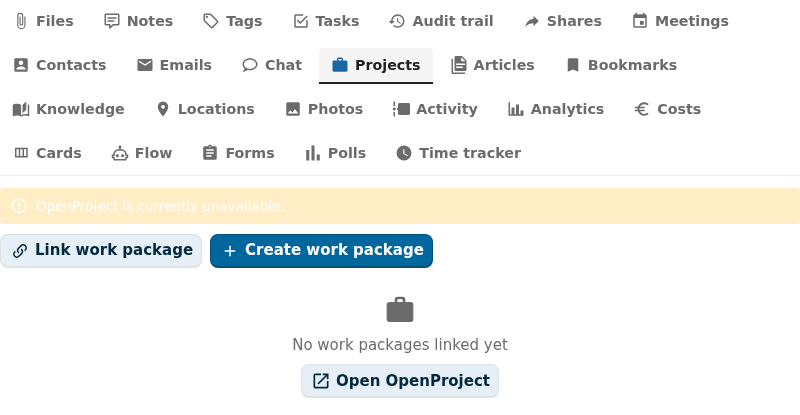
Captured by tests/e2e/leaf-screenshots.spec.ts against the seeded integration-verification register on the dev container. Empty state (Nothing linked yet) is expected on a freshly seeded object — link an upstream entity from the tab's + Add affordance to populate it.
What it does
- Lists OpenProject work packages linked to each Open Register object on the Projects sidebar tab.
- Lets users create a new work package on a chosen project + type straight from the object.
- Lets users link an existing work package by id or URL.
- Lets users update a linked work package (title, status, assignee) without leaving Open Register.
- Lets users unlink. The work package stays in OpenProject; only the OpenConnector pairing is removed.
- Resolves a
referenceType: 'openproject'schema property to a single-entity chip with the package id and status.
Setup
1. Install OpenConnector
Install the openconnector Nextcloud app. The Projects integration is hidden until OpenConnector is installed and enabled.
2. Create the openproject source
OpenProject offers an OAuth2 API and an API-key API. Both are supported. Open OpenConnector → Sources → New source:
- location — your OpenProject API base URL, for example
https://openproject.example.org/api/v3 - auth — OAuth2 (recommended) or API key (for headless integrations)
For OAuth2: register the OpenConnector callback URL with your OpenProject admin. For API key: generate one on OpenProject → My account → Access tokens. Save the source, then click Test connection.
3. Verify in Open Register
Go to Administration → Open Register → Integrations. The openproject row should report:
- Storage:
external - Required app:
openconnector - Auth status:
configured - Health:
ok
4. Use it on an object
Open any object whose schema declares linkedTypes: ['openproject']. The Projects tab appears in the sidebar.
- Link an existing work package — paste an OpenProject URL or work-package id.
- Create a new work package — pick a project + work-package type, give it a subject and description. The new work package lands in OpenProject and the link is recorded.
Local verification setup
The repo ships a docker-compose template that boots a real OpenProject all-in-one container alongside XWiki for the leaf-verification harness:
docker compose -f docker-compose.integration-verification.yml up -d verification-openproject
The compose service sets OPENPROJECT_ADDITIONAL__HOST__NAMES to include both localhost:8082 (browser admin) and verification-openproject (container-to-container). Without it OpenProject's Rails host-authorization layer rejects every cross-container request with HTTP 400 Invalid host_name configuration before it reaches a controller.
First-boot needs an admin password reset:
- Visit http://localhost:8082/login, sign in as
admin/admin. - OpenProject forces a password change. Pick a 10+ character one (e.g.
OpenProject1234). - Dismiss the onboarding tour (it overlays UI elements and blocks the next step).
- Go to My account → Access tokens → API token → Create.
- Copy the token. OpenProject shows it once, never again.
Both steps are scriptable with Playwright — the same browser harness used for the XWiki distribution wizard handles them in one pass.
Create the OpenConnector source pointing at the API base (/api/v3):
curl -u admin:admin -H 'OCS-APIRequest: true' -X POST \
  http://localhost:8080/index.php/apps/openconnector/api/sources \
  -H 'Content-Type: application/json' \
  -d '{
    "name": "OpenProject",
    "slug": "openproject",
    "reference": "openproject",
    "location": "http://verification-openproject:80/api/v3",
    "isEnabled": true,
    "type": "api",
    "auth": "basic",
    "username": "apikey",
    "password": "<your-api-token>",
    "headers": {"Accept": "application/json"}
  }'
OpenProject accepts HTTP Basic with apikey as the username and the API token as the password — that's the simplest auth for headless integrations. For production prefer OAuth2 with a scoped service account.
Probe the leaf:
curl -u admin:admin -H 'OCS-APIRequest: true' \
  "http://localhost:8080/index.php/apps/openregister/api/objects/{register}/{schema}/{object}/integrations/openproject"
# → 200 {"items": []}
Configuration
| Field | Open Register side | OpenProject side |
|---|---|---|
| Source slug | openproject | — |
| Storage | external (no link table) | — |
| Mapping | work-package id, subject, status, assignee, URL | /api/v3/work_packages/{id} |
| Refresh | Per render (OpenConnector cache configurable) | — |
| Auth | OAuth2 or API key | OAuth2 client or personal token |
| Permissions | Inherits from object RBAC | OpenProject project membership |
HAL+JSON envelope
OpenProject returns work packages in a HAL+JSON envelope. The leaf's normalizeList() reaches into _embedded.elements so the registry contract sees a clean rowset. The flat fields are exposed as id, title (subject), status, url.
Authentication
For production, prefer OAuth2 + a service account scoped to the projects you intend to integrate. API keys work for read-only or single-user automation but rotate manually. OpenConnector encrypts the secret at rest.
Using it
Projects sidebar tab
The tab lists linked work packages with title, status pill, and an "open in OpenProject" anchor. The inline "Link work package" form opens the link-or-create flow.
Detail-page widget
Surfaces linked work packages plus an aggregate status line ("3 work packages, 2 open, 1 closed"). The "Create work package" CTA opens the same flow as the tab.
Dashboard widgets
user-dashboard— your assigned work packages across every linked object.app-dashboard— work packages scoped to the consuming app.
Reference property
A schema property typed as { "type": "string", "referenceType": "openproject" } renders the linked work package's id + status chip in CnFormDialog and CnDetailGrid.
Troubleshooting
- No projects appear in the picker. The OAuth user or API-key user has no project membership. Add the user as a member of at least one project in OpenProject.
- "OpenConnector source missing" banner. You haven't created the
openprojectsource in OpenConnector yet, or you renamed it. The source slug must be exactlyopenproject. - "Authentication expired" banner. OAuth2 token can no longer be refreshed. Re-authenticate the OpenConnector source.
- Work package shows up but link 404s. The OpenProject base URL is misconfigured. Update
locationon the OpenConnector source. - Tab is missing. Either OpenConnector isn't installed or the object's schema does not declare
linkedTypes: ['openproject']. Check both.
Supported OpenProject versions
12.x and later. Earlier versions use a different REST contract and are not supported by the default OpenConnector adapter.
Related
- Leaf integration system — how every leaf wires the same way.
- xWiki leaf — the other external/OpenConnector-routed leaf.
- Deck leaf — the NC-native alternative if you don't need a full PM tool.
- OpenConnector docs — how to manage sources and credentials.
- Pluggable integration registry — the full ADR-019 contract.