Contacts integration
contactsvCard contacts linked to Open Register objects with a role per link (applicant, handler, advisor, ...). Reverse lookup from any contact answers 'which objects is this person on?'.
Link people to an object with a role per link. The same person can be an applicant on one case and an advisor on another. The link lives in openregister_contact_links (the role and cached display fields) plus X-OPENREGISTER-* properties on the vCard (so NC Contacts knows the person is linked too).
Screenshot
The integration registers in OpenRegister's in-page registry and renders as one of the tabs on the standalone integrations view. The tab is highlighted active here so you can see exactly which surface this leaf controls.
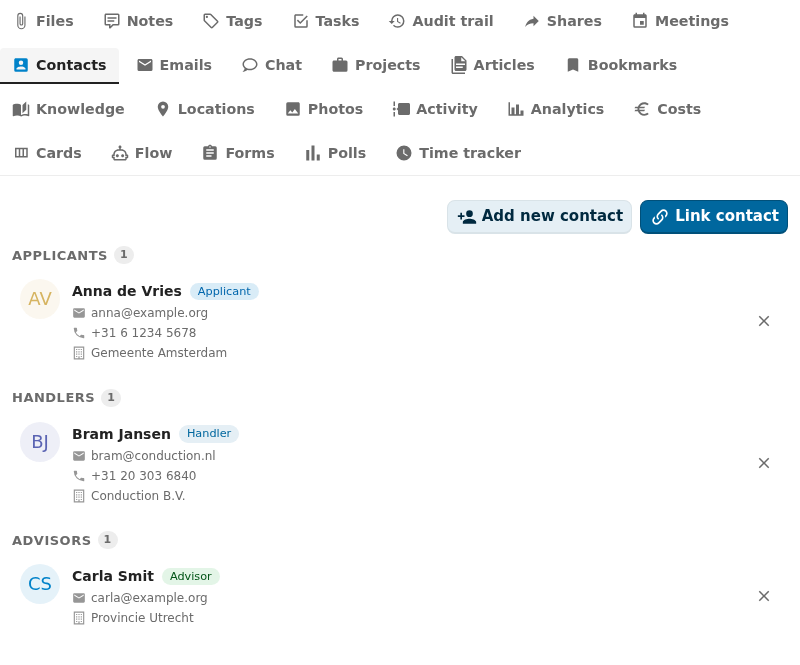
Captured by tests/e2e/leaf-screenshots.spec.ts against the seeded integration-verification register on the dev container. Empty state (Nothing linked yet) is expected on a freshly seeded object — link an upstream entity from the tab's + Add affordance to populate it.
What it does
- Lists vCard contacts linked to each Open Register object on the Contacts sidebar tab, grouped by role.
- Lets users link an existing contact (picker) or create a new contact from a name + email + phone (inline form).
- Lets users update a link's role without re-linking. The role lives on the link, not the contact.
- Lets users unlink a contact. The vCard stays in NC Contacts; the link row and
X-OPENREGISTER-*properties are removed. - Resolves a
referenceType: 'contacts'schema property to a single-entity chip with display name and role. - Reverse lookup: "all objects where person X has role Y" via
GET /api/contacts/{uid}/objects.
Setup
1. Install NC Contacts
Install the contacts Nextcloud app. Without it, the Contacts tab stays hidden and the OCS capabilities mark the leaf enabled: false.
2. Make sure each user has an addressbook
CardDAV creates a personal addressbook automatically on first use. If a user has none, the Contacts tab shows an empty state with a "Create an addressbook" link.
3. Use it on an object
Open any object whose schema declares linkedTypes: ['contacts']. The Contacts tab appears in the sidebar.
- Link an existing contact — open the picker, search by display name or email, pick one. Choose a role.
- Create a new contact — fill the inline form (display name, email, phone, role). The new vCard lands on the user's first addressbook, the link row is created with the right role.
- Change a role — click the role chip on a row. The dropdown lists the role enum your schema declares.
- Unlink — removes the link row and the
X-OPENREGISTER-*properties from the vCard. The vCard itself stays.
Configuration
| Field | Open Register side | NC Contacts side |
|---|---|---|
| Storage | link-table (openregister_contact_links) | vCard X-OPENREGISTER-OBJECT + X-OPENREGISTER-ROLE |
| Mapping | role, display name (cached), email (cached), linked-by, linked-at | vCard UID, FN, EMAIL, TEL |
| Roles | enum declared on schema (default: free-form string) | X-OPENREGISTER-ROLE |
| Refresh | Per render (CardDAV is real-time for the picker) | — |
| Permissions | Inherits from object RBAC | User owns their addressbook |
What gets stored on the vCard
BEGIN:VCARD
VERSION:3.0
UID:contact-9f4a
FN:Jane Doe
EMAIL;TYPE=INTERNET:jane@example.org
X-OPENREGISTER-OBJECT:e9e3cdeb-0c7d-4326-a57e-09907d9e06b7
X-OPENREGISTER-ROLE:applicant
END:VCARD
A contact can carry multiple X-OPENREGISTER-OBJECT and X-OPENREGISTER-ROLE lines (one pair per linked object) so reverse lookup works from a single vCard read.
Using it
Contacts sidebar tab
The tab groups linked contacts by role. Each row shows the contact's display name, email, role chip, and an "open in NC Contacts" anchor. The role chip is editable inline. An inline "Add contact" form opens the picker or the create-new flow.
Detail-page widget
Surfaces every linked contact, grouped by role, in a compact card. The picker / create-new flows are the same as the tab.
Dashboard widgets
user-dashboard— your top contacts across every linked object.app-dashboard— contacts scoped to the consuming app's register/schema.
Reference property
A schema property typed as { "type": "string", "referenceType": "contacts" } renders the linked contact's display name + role chip in CnFormDialog and CnDetailGrid. Use this for the "applicant" or "owner" field of an object.
Role enum on the schema
Declare the role enum on the schema for typed validation:
{
  "linkedTypes": ["contacts"],
  "x-contactRoles": ["applicant", "handler", "advisor", "observer"]
}
The Contacts tab and reference-property chip drop the role picker to the schema-declared enum when present.
Troubleshooting
- Picker shows no results. The user has no addressbook yet. Open NC Contacts at least once to create one.
- Same person linked twice with different roles. That is by design — each link is a (contact, object, role) triple. Unlink the role you don't want.
- "Contact link not found" on role update. The link row was already removed. Refresh the tab.
- Tab is missing. Either NC Contacts isn't installed or the object's schema does not declare
linkedTypes: ['contacts']. Check both.
Reverse lookup
To find every object a contact is linked to:
GET /index.php/apps/openregister/api/contacts/{contactUid}/objects
Returns the list of { objectUuid, register, schema, role, linkedAt } triples. Use this on a contact detail page to surface "which cases is this person on?".
Related
- Leaf integration system — how every leaf wires the same way.
- Calendar leaf — contacts and meetings are typically paired.
- Email leaf — link the messages where a contact appears.
- Pluggable integration registry — the full ADR-019 contract.